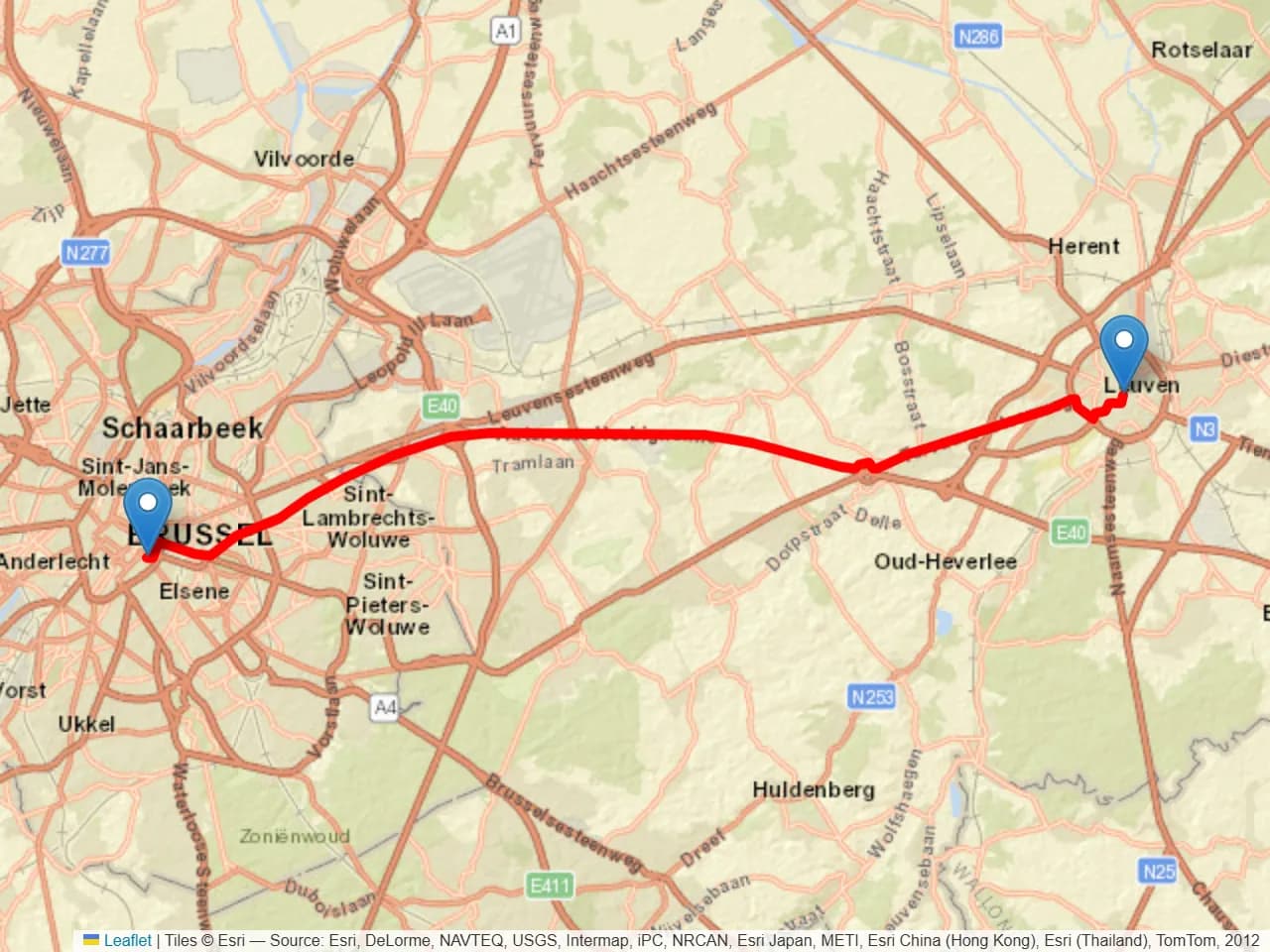
An implementation of A*, applied to a word ladder and to a real route between two places on OpenStreetMap.
Run in Google ColabColab requires a Google account, but you can also .
Reading mode. Below is the whole notebook, with the output of the code included. So you can simply read all of it here. To change the code and see what happens, you can go to Google Colab (external link).
In the chapter Heuristic Search you saw A* find the cheapest route in the demos. This notebook shows what that looks like in code: one short Python function that you can copy and use as a starting point for your own search problems.
You will use that same function twice:
- 🔤 to solve a word ladder: turn one word into another, one letter at a time;
- 🗺️ to plan a real route between two places, with map data from OpenStreetMap.
Prior knowledge: the chapters Search Algorithms and Heuristic Search. You don't need any programming experience: you can run the whole notebook without changing a single line.
Estimated time: about 30 minutes.
This notebook is part of AI voor Iedereen (KU Leuven). The latest version is always at ai.kuleuven.be/aivooriedereen/en/notebook/a-star-search, and you can open it directly in Google Colab (external link).
🚀 First time in a notebook?
Then the short introductory notebook explains everything step by step. The most important things:
- Make your own copy: File → Save a copy in Drive (in the menu at the top left), and work in that copy.
- Run a cell by clicking in it and pressing Shift+Enter, or with the ▶ button to its left. The result appears below the cell.
- Run the cells in order, from top to bottom, because a cell uses what the cells above it made. Does something behave strangely? Choose Runtime → Restart session and run everything again from the top.
Prefer not to use Google? Download the notebook file and open it in Jupyter (external link) or Visual Studio Code (external link).
🐍 Python in this notebook
New to Python? The introductory notebook explains the basics: variables, lists, dictionaries, loops and functions. On top of those, this notebook uses:
| Code | Meaning |
|---|---|
word = "sleep" | A piece of text, a string. It works much like a list of letters: positions start at 0, so word[0] is "s", word[:2] gives the letters before position 2 ("sl") and word[3:] the letters from position 3 on ("ep"). for letter in "abc": runs through its letters, + glues strings together, and text.split() cuts a text into a list of words. |
{"sleep", "dream"} | A set: a collection without order or duplicates. "sleep" in words checks in one go whether a word is in it, however big the set is, and visited.add(state) adds an item. set() is an empty set. |
while x < 100: | Repeats the indented lines below it as long as the condition is true. while frontier: repeats as long as the list frontier isn't empty. |
continue | Inside a loop: skip the rest of this round and go on with the next item. |
None | "Nothing": what a function gives back when it has no answer. if path is None: checks for it. |
return path, cost | Gives back two values at once; path, cost = a_star(...) catches them in two variables. |
a_star(start, goal, one_letter_changes, letters_to_change) | A function can be an input of another function. Pass its name without parentheses: a_star calls one_letter_changes(...) itself, as often as it needs. |
with open("data/words.txt") as file: | Opens a file; inside the indented block, file.read() gives its whole text. os.path.exists("data/words.txt") tells whether that file exists. |
🌟 The A* algorithm
In the chapter, A* keeps a frontier: the paths it may still extend, sorted by their f-value
where is the cost of the path so far and the heuristic: an estimate of the remaining cost to the goal. In every step, A* takes the path with the lowest out of the frontier and extends it with all neighboring states. As soon as it takes a path to the goal out of the frontier, that path is the cheapest one, provided the heuristic never estimates too high.
The function a_star below does exactly that. You give it four things:
start: the start state;goal: the goal state;neighbors: a function that gives, for a state, all states you can reach from it with one action, each with the cost of that action;heuristic: a function that estimates the remaining cost from a state to the goal.
It gives back the path it found (a list of states, from start to goal) and the total cost of that path.
For the frontier, the code uses heapq, Python's priority queue: heappush puts a path in the frontier, and heappop takes out the path with the lowest .
Run the code with Shift+Enter so the function is defined in this notebook from now on.
import heapq  # Python's priority queue


def a_star(start, goal, neighbors, heuristic):
    """
    Find the cheapest path from start to goal.
    Gives back the path (a list of states) and its total cost.
    """
    # The frontier holds paths as (f, g, path); heapq gives back the lowest f first.
    frontier = [(heuristic(start, goal), 0, [start])]  # start with one path, containing only the start state
    visited = set()  # the states whose neighbors we already added

    while frontier:  # as long as there are paths left in the frontier
        f, g, path = heapq.heappop(frontier)  # take out the path with the lowest f
        state = path[-1]  # the last state on that path

        if state == goal:
            return path, g  # the cheapest path to the goal!
        if state in visited:
            continue  # we already reached this state in a cheaper way: skip this path
        visited.add(state)

        for next_state, cost in neighbors(state):
            if next_state not in visited:
                new_g = g + cost  # the cost of the path, one step further
                new_f = new_g + heuristic(next_state, goal)  # f = g + h
                heapq.heappush(frontier, (new_f, new_g, path + [next_state]))

    return None, None  # the frontier is empty: there is no path to the goal
Running this cell shows nothing: it only defines the function. From now on, you can use a_star in every cell below it.
🔤 Example: a word ladder
A* works for every problem that you can describe with states, actions with a cost, and an estimate of the remaining cost. Take this word puzzle: turn one word into another by changing one letter at a time, where every step has to be a real word. From SLEEP to DREAM, for example:
SLEEP → SHEEP → CHEEP → CHEEK → CREEK → CREAK → CREAM → DREAM
Lewis Carroll, the author of Alice in Wonderland, invented this puzzle at Christmas 1877 and called it Doublets.
As a search problem, a state is a word, and the neighbors of a word are all real words that differ from it in exactly one letter. Every step costs 1, so the cheapest path is the shortest ladder.
First download a list of real words: about 14,800 English words of five letters.
# On your own computer, this installs the package for downloading files (Colab has it already)
%pip install --quiet requests
import os
import requests

DATA_URL = "https://ai.kuleuven.be/aivooriedereen/notebooks/data/"

if os.path.exists("data/five-letter-words.txt"):  # a copy of the word list next to this notebook?
    with open("data/five-letter-words.txt") as file:
        text = file.read()
else:  # otherwise, download it from the website
    response = requests.get(DATA_URL + "five-letter-words.txt")
    response.raise_for_status()  # stop with an error if the download failed
    text = response.text
words = set(text.split()) # a set: looking up a word in it is instantprint(len(words), "words")
print("Is 'sleep' a word?", "sleep" in words)
print("Is 'slepp' a word?", "slepp" in words)14782 words Is 'sleep' a word? True Is 'slepp' a word? False
The neighbors of a word: for every position in the word, try all 26 letters, and keep the new words that are in the list.
def one_letter_changes(word):
    """All real words that differ from word in one letter, each with cost 1."""
    changes = []
    for position in range(len(word)):
        for letter in "abcdefghijklmnopqrstuvwxyz":
            # the word with the letter at this position replaced:
            new_word = word[:position] + letter + word[position + 1:]
            if new_word in words and new_word != word:
                changes.append((new_word, 1))
    return changes


print(one_letter_changes("sleep"))[('bleep', 1), ('cleep', 1), ('pleep', 1), ('sheep', 1), ('steep', 1), ('sweep', 1), ('sleek', 1), ('sleer', 1), ('sleet', 1)]🧭 An estimate that never overestimates
A* also needs a heuristic: an estimate of how many steps are still needed. Here a simple one works well: count the letters that still differ from the goal word. Every step changes exactly one letter, so you need at least that many steps. From SLEEP to DREAM, four letters differ (only the E in the middle is already right), while the ladder above takes seven steps: the estimate is too low, but never too high. That is exactly what A* needs to be sure it finds the shortest ladder.
def letters_to_change(word, goal):
    """How many letters still differ from goal? You need at least that many steps."""
    different = 0
    for position in range(len(word)):
        if word[position] != goal[position]:
            different = different + 1
    return different


print(letters_to_change("sleep", "dream"))4
Now let A* search. Type two words of five letters (in lowercase) in the fields next to the code, or change the text between the quotes.
start = "sleep"  # @param {type:"string"}
goal = "dream"  # @param {type:"string"}

path, cost = a_star(start, goal, one_letter_changes, letters_to_change)

if path is None:
    print("There is no word ladder from", start, "to", goal)
else:
    print("From", start, "to", goal, "in", cost, "steps:")
print(path)From sleep to dream in 6 steps: ['sleep', 'bleep', 'bleed', 'breed', 'bread', 'bream', 'dream']
How much does the estimate help? The cell below lets A* count the words it looks at: once with the estimate, and once with an estimate of 0. Without an estimate, A* sorts the frontier by the cost so far alone, so it is exactly uniform cost search from the chapter.
looked_at = []


def changes_counted(word):
    """The same as one_letter_changes, but remembers every word that A* looks at."""
    looked_at.append(word)
    return one_letter_changes(word)


def no_estimate(word, goal):
    return 0


a_star(start, goal, changes_counted, letters_to_change)
print("With the estimate, A* looked at", len(looked_at), "words")

looked_at.clear()
a_star(start, goal, changes_counted, no_estimate)
print("Without an estimate (uniform cost search), A* looked at", len(looked_at), "words")With the estimate, A* looked at 80 words Without an estimate (uniform cost search), A* looked at 1400 words
Both searches find a ladder of the same length (uniform cost search is just as correct), but with the estimate A* looks at far fewer words: for SLEEP to DREAM about 17 times fewer. The bigger the problem, the bigger that difference gets. And did you notice? A* found an even shorter ladder than the one at the start of this section.
Try it yourself
- Try other pairs, such as
sword→stone,brain→heartorbread→toast. - Can you find a pair where there is no ladder? Hint: some words, such as
pizza, have no neighbors at all. - Pick two random words:
start = random.choice(sorted(words)), and the same forgoal(withimport randomat the top of the cell).
🗺️ Extra: a real route on OpenStreetMap
In practice, the states and actions usually come from data. In this extra part, you download the real road network around two places from OpenStreetMap (external link), the free world map that anyone can edit, and let the same a_star function plan a route. Just like on the map of Leuven in the chapter, the states are points on the roads and the actions are road segments with a length.
You don't need to understand every line below. The point is to see that it doesn't take much code to load real data and run your own A* on it.
First install OSMnx (external link), a package that downloads OpenStreetMap data as a graph, together with folium, which draws maps. In Colab this takes a few seconds; on your own computer it can take a few minutes.
# osmnx downloads the map, folium draws it, scikit-learn finds the nearest road
%pip install --quiet osmnx folium scikit-learn
Did the installation stop with a long error that mentions GDAL? Then there is no ready-made build of OSMnx's map libraries for your computer yet (this happens on Windows laptops with an ARM processor, for example). Run this extra part in Google Colab (external link) instead, where the installation works.
Two helper functions: one to download the roads around two places, and one to draw a route on a map.
import folium
import osmnx as ox


def download_roads(point_a, point_b, network_type="drive", margin=0.01):
    """Download the roads in a rectangle around two points: for cars ("drive"), bikes ("bike") or pedestrians ("walk")."""
    north = max(point_a[0], point_b[0]) + margin  # 0.01 degrees is about 1 km
    south = min(point_a[0], point_b[0]) - margin
    east = max(point_a[1], point_b[1]) + margin
    west = min(point_a[1], point_b[1]) - margin
    rectangle = (west, south, east, north)
    return ox.graph_from_bbox(rectangle, network_type=network_type, simplify=False)


def show_route(roads, route):
    """Draw a route (a list of points on the roads) as a red line on a map."""
    coordinates = []
    for node in route:
        point = roads.nodes[node]
        coordinates.append((point["y"], point["x"]))  # (latitude, longitude)
    route_map = folium.Map(tiles="Esri.WorldStreetMap")  # OpenStreetMap's own tile server blocks maps shown in Colab; Esri's free street map doesn't
    folium.PolyLine(coordinates, color="red", weight=5).add_to(route_map)
    folium.Marker(coordinates[0], tooltip="Start").add_to(route_map)
    folium.Marker(coordinates[-1], tooltip="Goal").add_to(route_map)
    route_map.fit_bounds(coordinates)  # zoom in on the route
    return route_map
📍 Choose two places
Type two places in the fields next to the code (in Colab), or change the text between the quotes, and pick the kind of roads: for cars (drive), bikes (bike) or pedestrians (walk). Then run the cell. For two places 25 km apart, the download takes about 20 seconds: the further apart the places, the larger the map, and the longer it takes.
Changed something here? Run this cell again, and then the cells below it as well: they search the road network that this cell downloaded.
start_place = "Universiteitshal, Leuven"  # @param {type:"string"}
goal_place = "Royal Palace, Brussels"  # @param {type:"string"}
network_type = "drive"  # @param ["drive", "bike", "walk"]

# Look up the coordinates (latitude, longitude) of both places
start_point = ox.geocode(start_place)
goal_point = ox.geocode(goal_place)
print(start_place, "is at", start_point)
print(goal_place, "is at", goal_point)

# Download the road network around both places
roads = download_roads(start_point, goal_point, network_type)
print("Downloaded", len(roads.nodes), "points and", len(roads.edges), "road segments")Universiteitshal, Leuven is at (50.8778976, 4.7005511) Royal Palace, Brussels is at (50.8419277, 4.3622722)
Downloaded 59632 points and 95209 road segments
If a place can't be found, describe it more precisely, for example with a street address such as "Naamsestraat 22, Leuven". If the download fails, the OpenStreetMap server is probably busy: wait a minute and run the cell again.
🔍 Search with A*
The road network is a graph: the nodes are points on the roads, each with a latitude (y) and a longitude (x), and the edges are the road segments between them, each with a length in meters. To search it with a_star, you write the same two functions as for the word ladder:
road_neighborsgives the points you can drive to directly, with the length of that road segment as the cost;straight_line_distanceis the heuristic: the distance as the crow flies. A road is never shorter than a straight line, so this estimate is never too high.
Then you look up the point on the roads closest to each place, and search. Did you just change the places or the kind of roads above? Run that cell first, so that roads holds the right network.
def road_neighbors(node):
    """The points you can drive to from node, with the length of each road segment."""
    neighbors = []
    for from_node, to_node, length in roads.edges(node, data="length"):
        neighbors.append((to_node, length))
    return neighbors


def straight_line_distance(node, goal):
    """The distance as a bird flies between two points, in meters."""
    a = roads.nodes[node]
    b = roads.nodes[goal]
    return ox.distance.great_circle(a["y"], a["x"], b["y"], b["x"])


start_node = ox.nearest_nodes(roads, X=start_point[1], Y=start_point[0])
goal_node = ox.nearest_nodes(roads, X=goal_point[1], Y=goal_point[0])

route, length = a_star(start_node, goal_node, road_neighbors, straight_line_distance)
print("Route found:", round(length / 1000, 1), "km")Route found: 26.0 km
show_route(roads, route)The red line is the shortest route in distance, not necessarily the fastest one: our A* only counts meters, while a navigation app also takes the speed on every road into account. Want to try more?
- Choose two places of your own in the cell with the text fields, and run the cells below it again.
- How much does the heuristic help here? Search again with
no_estimatefrom the word ladder as the heuristic (uniform cost search), and compare how long both searches take, or count the points they look at like you did for the words. - Let A* find the fastest route instead of the shortest one:
ox.routing.add_edge_speeds(roads)followed byox.routing.add_edge_travel_times(roads)gives every road segment atravel_timein seconds. Use that as the cost instead oflength. The heuristic then has to become a time as well: the straight-line distance at the highest speed on the map, so that it still never overestimates. - Plan a bike or walking route between two places in the same city: pick
bikeorwalkin the dropdown next to the code of 📍 Choose two places (or change the text), and run that cell and the cells below it again. For bikes and pedestrians there are many more paths than for cars, so the download grows quickly with the distance.
🧰 A* for your own problem
a_star works for every problem that you can describe as a search problem. You only write two functions, just like one_letter_changes and letters_to_change above:
neighbors(state)gives a list of(next_state, cost)pairs: all states you can reach with one action, each with the cost of that action. Use simple values as states: a number, a text, or a tuple such as(row, column).heuristic(state, goal)estimates the remaining cost, and may never estimate too high. Can't think of a good estimate? Let it return 0: A* then becomes uniform cost search, which is just as correct, but slower.
Then path, cost = a_star(start, goal, neighbors, heuristic) does the rest. Think of a maze or a board game on a grid (with the Manhattan distance as the estimate), a sliding puzzle, or your daily commute.
By Thomas Winters (external link) for AI voor Iedereen, KU Leuven. The latest version of this notebook: ai.kuleuven.be/aivooriedereen/en/notebook/a-star-search.