Call a free language model from Python, and make it an agent that plans which train takes you to your first class, with the live train times, the weather forecast and your timetable.
Run in Google ColabColab requires a Google account, but you can also .
Reading mode. Below is the whole notebook, with the output of the code included. So you can simply read all of it here. To change the code and see what happens, you can go to Google Colab (external link).
In the chapter Large language models, a chatbot became an agent as soon as it could use tools. In this notebook you do that yourself, in Python: you talk to a free language model through its API, and you turn it into an assistant that plans your train to class, with the live timetable of the Belgian railways and the weather forecast.
You will:
- 🔑 get a free key, 💬 send your first messages to a language model, and see what it can't know;
- 🛠️ give it its first tool: the live train timetable;
- 🔁 let it use several tools in a loop, until it can tell you which train to take to be on time for your first class.
Prior knowledge: the chapter Large language models, especially the part about tools and agents.
Estimated time: about 35 minutes. You need a free account at OpenRouter, which gives you 50 free requests per day; the whole notebook uses about 15 of them.
This notebook is part of AI voor Iedereen (KU Leuven). The latest version is always at ai.kuleuven.be/aivooriedereen/en/notebook/large-language-models, and you can open it directly in Google Colab (external link).
🚀 First time in a notebook?
Then the short introductory notebook explains everything step by step. The most important things:
- Make your own copy: File → Save a copy in Drive (in the menu at the top left), and work in that copy.
- Run a cell by clicking in it and pressing Shift+Enter, or with the ▶ button to its left. The result appears below the cell.
- Run the cells in order, from top to bottom, because a cell uses what the cells above it made. Does something behave strangely? Choose Runtime → Restart session and run everything again from the top.
Prefer not to use Google? Download the notebook file and open it in Jupyter (external link) or Visual Studio Code (external link). Put your key in an environment variable OPENROUTER_API_KEY, or type it in when the notebook asks for it.
🐍 Python in this notebook
New to Python? The introductory notebook explains the basics: variables, lists, loops and functions. On top of those, this notebook uses:
| Code | Meaning |
|---|---|
{"role": "user", "content": "Hi"} | A dictionary: values with a name. Here it's one message, saying who speaks and what they say. A conversation is a list of them. |
client.chat.completions.create(model=..., messages=...) | Sends a conversation to a language model, and waits for its answer. |
response.choices[0].message.content | The text of that answer. |
def f(day: str) -> dict: with """...""" below it | A function with type hints (what goes in and comes out) and a docstring (what it does). The model reads both. |
f(**arguments) | Calls a function with the values in a dictionary as its arguments, such as the ones the model chose. |
def ask(messages, **options): | Accepts any other named arguments as a dictionary options, and create(**options) passes them on. |
requests.get(url, params=...) | Asks a web API for data. .json() turns its answer into Python lists and dictionaries. |
json.dumps(data), json.loads(text) | Turns lists and dictionaries into text in the JSON (external link) format, and back. |
datetime.now(BRUSSELS), timedelta(days=1) | The date and time in Belgium now, and one day, to add to a date. |
f"{now:%A %d %B}" | Writes a date out inside an f-string, such as "Thursday 29 October". |
try: ... except Exception as error: | Catches an error, so that the code can carry on instead of stopping. |
🔑 A free key
A language model like the ones in the chapter runs on the computers of a company. Your program sends it a question over the internet, through an API (application programming interface): a door for programs instead of people. To use that door, you need a key: a long secret code that says who is knocking.
This notebook uses OpenRouter (external link): with one key you can reach hundreds of models from different companies, and some of them are free. To get a key:
- Make an account at openrouter.ai (external link). For the free models, you don't need to buy anything.
- Create a key on the page Keys (external link), and copy it right away: OpenRouter only shows it once.
- In Colab, click the 🔑 key icon in the bar on the left (Secrets), choose Add new secret, call it
OPENROUTER_API_KEY, paste the key as its value, and switch on Notebook access.
Never put a key in the code itself: whoever gets your notebook would also get your key. A Secret stays in your own Colab account.
Free, but not private and not fast. The free models run at companies that may keep and learn from what you send them, so treat everything you send as if you posted it in public: no personal data, no passwords, nothing confidential (see Privacy in the chapter). Everybody shares those free models, so they are sometimes busy, and you get at most 20 requests per minute and 50 per day. Does a free model answer No endpoints found matching your data policy? Then allow the free models under Settings → Privacy (external link) on OpenRouter.
# Colab already has these packages; elsewhere, this installs them (tzdata: the time zones, for Windows)
%pip install --quiet openai markdown tzdata
import getpass
import html
import inspect
import json
import os
import re
import time
from datetime import datetime, timedelta
from zoneinfo import ZoneInfo
import markdown
import pandas as pd
import requests
from IPython.display import HTML, display
from openai import OpenAI
BRUSSELS = ZoneInfo("Europe/Brussels")try:
from google.colab import userdata # in Colab: the key from the 🔑 Secrets
api_key = userdata.get("OPENROUTER_API_KEY")
except ImportError: # elsewhere: an environment variable, or type it in
api_key = os.environ.get("OPENROUTER_API_KEY") or getpass.getpass("Your OpenRouter key: ")
client = OpenAI(base_url="https://openrouter.ai/api/v1", api_key=api_key)
# The free model we use, followed by the free models that OpenRouter tries when it's busy
MODEL = "nvidia/nemotron-3.5-super-vl:free"
MODELS = [MODEL, "google/gemma-4-31b-it:free", "openrouter/free"]
answer = requests.get("https://openrouter.ai/api/v1/key", headers={"Authorization": f"Bearer {api_key}"})
answer.raise_for_status() # error 401 here: the key is wrong
print("Your key works. Free requests left today:",
answer.json()["data"].get("free_model_daily_requests", {}).get("remaining"))Your key works. Free requests left today: 37
💬 Your first call
A request to a language model has two parts: which model you want, and the messages of the conversation so far. Every message is a dictionary that says who speaks (role) and what they say (content). A first question is a single message from the user. The answer can take half a minute; you'll see why below.
start = time.perf_counter()
response = client.chat.completions.create(
    model=MODEL,
    messages=[{"role": "user", "content": "Write a limerick about the train from Leuven to Ghent."}],
    extra_body={"models": MODELS},                          # an option of OpenRouter: the backup models
)
seconds = time.perf_counter() - start

print(response.choices[0].message.content)
print(f"\n{seconds:.1f} seconds, answered by {response.model}")
print(f"{response.usage.prompt_tokens} tokens in, {response.usage.completion_tokens} tokens out")A student rode trains to Ghent, Until all his money was spent. Past fields of wheat, And rows of beet, He returned to old Leuven content. 21.2 seconds, answered by nvidia/nemotron-3.5-super-vl:free 31 tokens in, 3208 tokens out
The answer is a message too, with the role assistant, and response.choices[0].message.content is its text. Below it, you see how long it took, which model answered, and how many tokens went in and came out. Models you pay for charge per token; the free ones count your requests instead. extra_body holds options that only OpenRouter knows, such as models: when the first model is busy, OpenRouter passes your question on to the next one in the list.
Probably many more tokens came out than five lines of a limerick need, and that's why it took a while. Most of these models are reasoning models: before the answer you get to see, they write out their thoughts. Those are in the response too:
message = response.choices[0].message
print((getattr(message, "reasoning", None) or "(this model shows no thoughts)")[:1000], "...")The user wants a limerick about the train from Leuven to Ghent. A limerick has: - 5 lines - AABBA rhyme scheme - Lines 1, 2, and 5 are longer, typically 3 beats (anapestic) - Lines 3 and 4 are shorter, typically 2 beats - Often humorous or whimsical Key elements to include: - Leuven (LOO-vun) - city in Belgium - Ghent (GENT) - city in Belgium - Train journey between them - Belgian context (maybe mention Flemish, trains, SNCB/NMBS, beer, students, medieval architecture) Rhyme scheme: AABBA - Line 1 ends with something rhyming with line 2 and 5 - Line 3 and 4 rhyme with each other Possible rhymes for Leuven/Ghent/train/Belgium: - Leuven - heaven, eleven, leaven (weak) - Ghent - went, spent, bent, rent, cent - Train - rain, plain, main, pain, Spain (maybe too far) - Belgium - helium (too silly), realm (near rhyme) Let's try: Line 1: The train from Leuven to Ghent (A - Gent) Line 2: Is packed with commuters who went (A - went/went) - hmm, "went" rhymes with Ghent Wait, line 1 ends wi ...
For a limerick, that's a lot of thinking. For a task with several steps, like the planning at the end of this notebook, it pays off. From now on, ask sends a conversation with the same backup models, so that the code stays short:
def ask(messages, **options):
    # Sends a conversation to the model (or a backup when it's busy), and returns the response
    return client.chat.completions.create(model=MODEL, messages=messages, extra_body={"models": MODELS}, **options)
OpenRouter's list of free models changes every few weeks. This cell asks for the current list, and only keeps the models that can use tools, which you'll need later. The number behind each model is how many tokens it can take in at once. To try another model, change MODEL in the cell with your key, and run the cells again from there.
models = requests.get("https://openrouter.ai/api/v1/models").json()["data"]
for model in models:
    if model["id"].endswith(":free") and "tools" in model["supported_parameters"]:
print(f"{model['id']:50} {model['context_length'] or 0:>11,} tokens")recursive/flint-v1.0:free 262,144 tokens xingchen-agi/xing4.0-29b-a4b:free 262,144 tokens nvidia/nemotron-3.5-super-vl:free 1,000,000 tokens dots-studio/dots-3-note-preview:free 512,000 tokens liquid/lfm-2.5-2.6b:free 65,536 tokens nvidia/nemotron-3.5-lightning:free 1,000,000 tokens thinkingmachines/inkling-small:free 1,048,576 tokens poolside/laguna-s-2.1:free 262,144 tokens thinkingmachines/inkling:free 1,048,576 tokens poolside/laguna-xs-2.1:free 262,144 tokens cohere/north-mini-code:free 256,000 tokens nvidia/nemotron-3-ultra-550b-a55b:free 1,000,000 tokens nvidia/nemotron-3-nano-omni-30b-a3b-reasoning:free 256,000 tokens google/gemma-4-26b-a4b-it:free 262,144 tokens google/gemma-4-31b-it:free 262,144 tokens
🎭 A system prompt and a conversation
A chatbot is a language model with a system prompt in front of the conversation: a first message, with the role system, that says who the model is and how it should answer (see From autocomplete to chatbot).
And the API remembers nothing. To continue a conversation, you send the whole conversation again, with the model's answer and your next question added to the end. show_messages draws such a conversation the way the model reads it: as one long script. You don't need to read its code; it only draws.
STYLES = {  # role: label, background, edge
    "system": ("⚙️ System", "#f1f5f9", "#94a3b8"),
    "user": ("🧑 User", "#eff6ff", "#60a5fa"),
    "assistant": ("🤖 Assistant", "#fff7ed", "#fb923c"),
    "tool": ("🛠️ Tool", "#ecfdf5", "#34d399"),
}
CODE = '<code style="color:#0f172a;background:none">'


def script(messages):
    # A conversation as the script that the model reads, in HTML: thoughts, tool calls and tool results included
    blocks = []
    for message in messages:
        label, background, edge = STYLES[message["role"]]
        parts = []
        if message.get("reasoning"):
            parts.append(f'<i style="color:#64748b">💭 {html.escape(message["reasoning"][:300])} …</i>')
        if message["role"] == "tool":
            result = message["content"] if len(message["content"]) < 400 else message["content"][:400] + " …"
            parts.append(CODE + html.escape(result) + "</code>")
        elif message["role"] == "assistant" and message.get("content"):
            answer = markdown.markdown(message["content"], extensions=["tables"])    # bold, lists and tables
            answer = answer.replace("<p>", '<p style="margin:0">').replace("<table>", '<table style="border-collapse:collapse">')
            parts.append(re.sub(r"<(td|th)( [^>]*)?>", r'<\1 style="border:1px solid #fdba74;padding:2px 8px">', answer))
        elif message.get("content"):
            parts.append(html.escape(message["content"]).replace("\n", "<br>"))
        for call in message.get("tool_calls") or []:
            parts.append(CODE + f'{call["function"]["name"]}({html.escape(call["function"]["arguments"])})</code>')
        blocks.append(f'<div style="background:{background};border-left:4px solid {edge};color:#0f172a;'
                      f'padding:6px 10px;margin:4px 0;font:14px/1.5 sans-serif"><b>{label}</b><br>{"<br>".join(parts)}</div>')
    return "".join(blocks)


def show_messages(messages):
    # Draws a conversation as that script
    display(HTML(script(messages)))
conversation = [
{"role": "system", "content": "You help students of KU Leuven. Answer in at most two sentences."},
{"role": "user", "content": "My first exam is on Monday. Any tips?"},
]
response = ask(conversation)
conversation.append({"role": "assistant", "content": response.choices[0].message.content})
print(response.usage.prompt_tokens, "tokens in")
conversation.append({"role": "user", "content": "And what if I can't sleep the night before?"})
response = ask(conversation)
conversation.append({"role": "assistant", "content": response.choices[0].message.content})
print(response.usage.prompt_tokens, "tokens in")
show_messages(conversation)42 tokens in
106 tokens in
You help students of KU Leuven. Answer in at most two sentences.
My first exam is on Monday. Any tips?
Focus on reviewing your summaries and key learning objectives rather than trying to learn new material. Make sure to get a good night's sleep and double-check your exam time and location via SIS or Canvas.
And what if I can't sleep the night before?
Don't panic; one night of poor sleep rarely ruins exam performance, so try a calming routine like reading or breathing exercises instead of forcing sleep. The next day, stay hydrated, eat a light breakfast, limit caffeine, and arrive early to settle in.
The second question only makes sense after the first one: the night before what? The model knows, because the whole conversation went along, and you see that in the number of tokens that went in, which grows with every turn. That's the context from the chapter: all the model knows about this conversation is what you send it.
Change the system prompt (for example to "Answer like a pirate") and run the cell again.
🚆 Asking about trains without tools
Now the question that this notebook is about. Ask the model about a train:
question = [{"role": "user", "content": "What day is it today, and when does the next train from Leuven to Ghent leave?"}]
response = ask(question)
show_messages(question + [response.choices[0].message.model_dump(exclude_none=True)])What day is it today, and when does the next train from Leuven to Ghent leave?
💭 We need answer user. Need know current date? System current date 2026-04-26. User asks: "What day is it today, and when does the next train from Leuven to Ghent leave?" Need answer likely based on current date and maybe schedule. Need be careful: As AI, current date is 2026-04-26 per system. Need ma …
Today is Sunday, April 26, 2026.
I don’t have live train schedule access, so I can’t tell you the exact next departure from Leuven to Ghent right now. For real-time departures, check the SNCB app, Belgian rail website, or Google Maps.
On Sundays, train frequency can be lower, so it’s best to check the current schedule before heading out. 🚆
The model has no clock and no timetable: all it has is what it read during its training, which ended months ago. Depending on the model, it admits that it can't know, or it makes up a day and a train that sound real: a hallucination.
Both problems have a solution. The model always needs to know the date, so that goes into the system prompt, every time. The train times change all day, so for those, the model needs a tool.
🛠️ Your first tool
A tool is a function in your own code. You describe it to the model, and when the model needs it, it doesn't answer, but asks you to run it, with arguments that it filled in itself. Your code runs the function and sends the result back, and only then does the model answer (see Tool calling).
This first tool asks the iRail API (external link) for train connections: an open-source project that offers the timetable of the NMBS/SNCB for free, without a key. The tool takes the date and the time the way people write them, and converts them to the format that iRail wants: the model shouldn't have to know that. And it only keeps the few fields that matter, instead of the 11 kilobytes that iRail sends for three trains, because everything the model gets back takes up room in its context.
# iRail asks every program to say who it is
HEADERS = {"User-Agent": "AI-voor-Iedereen-notebook/1.0 (https://ai.kuleuven.be/aivooriedereen)"}


def clock(timestamp):
    # A time from iRail (seconds since 1 January 1970) as HH:MM in Belgium
    return datetime.fromtimestamp(int(timestamp), BRUSSELS).strftime("%H:%M")


def find_trains(from_station: str, to_station: str, date: str, time: str, arrive_by: bool = False) -> list:
    """Train connections in Belgium, from the live timetable of the NMBS/SNCB.

    Args:
        from_station: The station to leave from, for example "Gent-Sint-Pieters".
        to_station: The station to travel to, for example "Leuven".
        date: The day of travel, as YYYY-MM-DD.
        time: A time as HH:MM. The trains leave after this time, or arrive before it if arrive_by is true.
        arrive_by: True for the trains that arrive before the time, instead of the ones that leave after it.
    """
    moment = datetime.strptime(f"{date} {time}", "%Y-%m-%d %H:%M")
    answer = requests.get("https://api.irail.be/v1/connections/", headers=HEADERS, params={
        "from": from_station, "to": to_station, "format": "json", "lang": "en",
        "date": moment.strftime("%d%m%y"), "time": moment.strftime("%H%M"),
        "timesel": "arrival" if arrive_by else "departure",
    })
    if answer.status_code == 400:                            # such as a station that doesn't exist:
        raise ValueError(answer.json()["message"])            # pass on the reason, so the model can fix it
    answer.raise_for_status()
    trains = []
    for connection in answer.json()["connection"]:
        trains.append({
            "departure": clock(connection["departure"]["time"]),
            "arrival": clock(connection["arrival"]["time"]),
            "minutes": int(connection["duration"]) // 60,
            "transfers": int(connection.get("vias", {}).get("number", 0)),
            "platform": connection["departure"]["platform"],
            "delay_minutes": int(connection["departure"]["delay"]) // 60,
            "canceled": connection["departure"]["canceled"] == "1",
        })
    return trains


tomorrow = (datetime.now(BRUSSELS) + timedelta(days=1)).strftime("%Y-%m-%d")
HTML(pd.DataFrame(find_trains("Gent-Sint-Pieters", "Leuven", tomorrow, "09:00", arrive_by=True)).to_html(index=False))| departure | arrival | minutes | transfers | platform | delay_minutes | canceled |
|---|---|---|---|---|---|---|
| 06:55 | 07:55 | 60 | 0 | 9 | 0 | False |
| 07:01 | 08:04 | 63 | 0 | 10 | 0 | False |
| 07:25 | 08:23 | 58 | 0 | 10 | 0 | False |
| 07:34 | 08:39 | 65 | 1 | 10 | 0 | False |
| 07:43 | 08:51 | 68 | 0 | 10 | 0 | False |
| 07:55 | 08:55 | 60 | 0 | 8 | 0 | False |
Those are the trains that arrive in Leuven before 9 tomorrow, as Python sees the function. The model sees something else: a description in JSON, with the name of the function, what it does, and its arguments. tool_schema writes that description from the function itself, from its type hints (str, bool) and its docstring. That's why the docstring matters so much: it's the only manual the model gets.
JSON_TYPES = {str: "string", int: "integer", float: "number", bool: "boolean"}


def tool_schema(function):
    # The description of a Python function that the model gets to see
    description, _, args_text = inspect.getdoc(function).partition("Args:")
    explained = dict(re.findall(r"^\s*(\w+): (.+)$", args_text, re.MULTILINE))
    properties, required = {}, []
    for name, parameter in inspect.signature(function).parameters.items():
        properties[name] = {"type": JSON_TYPES[parameter.annotation], "description": explained.get(name, "")}
        if parameter.default is inspect.Parameter.empty:
            required.append(name)
    return {"type": "function", "function": {
        "name": function.__name__,
        "description": description.strip(),
        "parameters": {"type": "object", "properties": properties, "required": required},
    }}


print(json.dumps(tool_schema(find_trains), indent=2)){
"type": "function",
"function": {
"name": "find_trains",
"description": "Train connections in Belgium, from the live timetable of the NMBS/SNCB.",
"parameters": {
"type": "object",
"properties": {
"from_station": {
"type": "string",
"description": "The station to leave from, for example \"Gent-Sint-Pieters\"."
},
"to_station": {
"type": "string",
"description": "The station to travel to, for example \"Leuven\"."
},
"date": {
"type": "string",
"description": "The day of travel, as YYYY-MM-DD."
},
"time": {
"type": "string",
"description": "A time as HH:MM. The trains leave after this time, or arrive before it if arrive_by is true."
},
"arrive_by": {
"type": "boolean",
"description": "True for the trains that arrive before the time, instead of the ones that leave after it."
}
},
"required": [
"from_station",
"to_station",
"date",
"time"
]
}
}
}Now the model gets a question, today's date in the system prompt, and this description in tools. Look at what comes back:
now = datetime.now(BRUSSELS)
messages = [
    {"role": "system", "content": f"Today is {now:%A %d %B %Y}, and it is {now:%H:%M}."},
    {"role": "user", "content": "Which trains from Ghent get me to Leuven before 9 tomorrow morning?"},
]
response = ask(messages, tools=[tool_schema(find_trains)])
message = response.choices[0].message

print("Text:", message.content)
for call in message.tool_calls or []:
print("Tool call:", call.function.name, call.function.arguments)Text: None
Tool call: find_trains {"from_station":"Gent-Sint-Pieters","to_station":"Leuven","date":"2026-10-30","time":"09:00","arrive_by":true}Usually there's no answer yet, but a tool call: the name of a function and its arguments, in JSON. The model filled in a form, the description of the tool. Look at the arguments: did "Ghent" become a station, "tomorrow" a date (thanks to the date in the system prompt), and "before 9" arrive_by? Nothing has run yet: a model can only write text. Running the function is up to your code, which then sends the result back:
messages.append(message.model_dump(exclude_none=True))       # the model's turn, with its tool call
for call in message.tool_calls or []:
    result = find_trains(**json.loads(call.function.arguments))
    messages.append({"role": "tool", "tool_call_id": call.id, "content": json.dumps(result)})

response = ask(messages, tools=[tool_schema(find_trains)])
messages.append(response.choices[0].message.model_dump(exclude_none=True))
show_messages(messages)Today is Thursday 29 October 2026, and it is 01:04.
Which trains from Ghent get me to Leuven before 9 tomorrow morning?
💭 The user wants trains from Ghent to Leuven arriving before 9 AM tomorrow morning. First, determine tomorrow's date. Today is Thursday 29 October 2026. Tomorrow is Friday 30 October 2026. Stations: "from Ghent" - likely Gent-Sint-Pieters (main station in Ghent). "to Leuven" - likely Leuven station. …
find_trains({"from_station":"Gent-Sint-Pieters","to_station":"Leuven","date":"2026-10-30","time":"09:00","arrive_by":true})[{"departure": "06:55", "arrival": "07:55", "minutes": 60, "transfers": 0, "platform": "9", "delay_minutes": 0, "canceled": false}, {"departure": "07:01", "arrival": "08:04", "minutes": 63, "transfers": 0, "platform": "10", "delay_minutes": 0, "canceled": false}, {"departure": "07:25", "arrival": "08:23", "minutes": 58, "transfers": 0, "platform": "10", "delay_minutes": 0, "canceled": false}, {"de …💭 I got a list of trains. Now I need to present them clearly to the user. The user asked "Which trains from Ghent get me to Leuven before 9 tomorrow morning?" So I should list the departure times, arrival times, duration, transfers, platform, and note any delays/cancellations. Let's format a nice re …
Here are the trains from Gent-Sint-Pieters to Leuven on Friday, 30 October 2026 that arrive before 09:00:
| Departure | Arrival | Duration | Transfers | Platform | Delay | Canceled |
|---|---|---|---|---|---|---|
| 06:55 | 07:55 | 1h 00m | 0 | 9 | 0 min | No |
| 07:01 | 08:04 | 1h 03m | 0 | 10 | 0 min | No |
| 07:25 | 08:23 | 0h 58m | 0 | 10 | 0 min | No |
| 07:34 | 08:39 | 1h 05m | 1 | 10 | 0 min | No |
| 07:43 | 08:51 | 1h 08m | 0 | 10 | 0 min | No |
| 07:55 | 08:55 | 1h 00m | 0 | 8 | 0 min | No |
All listed trains arrive in Leuven before 9:00 AM. The 07:34 departure involves one transfer; the rest are direct. No delays or cancellations are currently reported.
That's the whole script that the model read, from top to bottom: the system prompt, the question, its own thoughts and tool call, the result from iRail, and finally its answer, now with real train times. It's the script from the chapter, with a timetable instead of a calculator. Check the times in the answer against the tool result: the model should only use times that iRail sent.
🔁 Several tools in a loop
One question, one tool call: that's still a chatbot with a timetable. An agent keeps going: it calls a tool, reads the result, decides which tool it needs next, and only stops when it can answer. That loop is short enough to write yourself. run_agent sends the conversation with the descriptions of all the tools, runs every tool call (sometimes several at once), and stops as soon as the model answers without calling a tool. Meanwhile, it shows the script as it grows. When a tool fails, it sends the error back as the result, so that the model can try again, for example with another station name.
def run_agent(question, tools, system, max_steps=10):
    # Lets the model call tools until it has an answer; shows the script while it grows, and returns it
    functions = {function.__name__: function for function in tools}
    schemas = [tool_schema(function) for function in tools]
    messages = [{"role": "system", "content": system}, {"role": "user", "content": question}]
    screen = display(HTML(script(messages)), display_id=True)
    for step in range(max_steps):
        message = ask(messages, tools=schemas).choices[0].message
        messages.append(message.model_dump(exclude_none=True))
        for call in message.tool_calls or []:
            try:
                result = functions[call.function.name](**json.loads(call.function.arguments))
            except Exception as error:                         # the model gets the error, and can react to it
                result = f"Error: {error}"
            messages.append({"role": "tool", "tool_call_id": call.id, "content": json.dumps(result)})
        screen.update(HTML(script(messages)))
        if not message.tool_calls:                             # no tool call: this was the answer
            break
    return messages
The planner needs two more tools. The first one is your timetable. Here it's an example week, which you can replace with your own classes. Every class also says how long it takes to get there from Leuven station. The second tool asks Open-Meteo (external link), a free weather service without a key, for the forecast at one hour, after looking up where the place is.
# An example week: start, end, course, building, and the way there from Leuven station
TIMETABLE = {
    "Monday": [("10:30", "12:30", "Statistics", "Aula Pieter De Somer", "20 minutes on foot"),
               ("14:00", "16:00", "Programming", "Arenberg campus, Heverlee", "15 minutes by bus")],
    "Tuesday": [("08:30", "10:30", "Chemistry", "Gasthuisberg campus", "15 minutes by bus"),
                ("13:00", "15:00", "Statistics", "Aula Pieter De Somer", "20 minutes on foot")],
    "Wednesday": [("10:30", "12:30", "Economics", "Erasmushuis", "15 minutes on foot")],
    "Thursday": [("09:00", "11:00", "Programming", "Arenberg campus, Heverlee", "15 minutes by bus"),
                 ("14:00", "17:00", "Lab session", "Arenberg campus, Heverlee", "15 minutes by bus")],
    "Friday": [("08:30", "10:30", "Academic writing", "Erasmushuis", "15 minutes on foot"),
               ("11:00", "13:00", "Economics", "Erasmushuis", "15 minutes on foot")],
}


def get_timetable(date: str) -> dict:
    """The classes of the student on one day, with where they are and how to get there from Leuven station.

    Args:
        date: The day, as YYYY-MM-DD.
    """
    weekday = datetime.strptime(date, "%Y-%m-%d").strftime("%A")
    classes = [{"start": start, "end": end, "course": course, "building": building, "from_leuven_station": way}
               for start, end, course, building, way in TIMETABLE.get(weekday, [])]
    return {"date": date, "weekday": weekday, "classes": classes}


def get_weather(place: str, date: str, hour: int) -> dict:
    """The weather forecast for a place in Belgium at one hour of a day, up to two weeks ahead.

    Args:
        place: A town or city in Belgium, for example "Leuven".
        date: The day, as YYYY-MM-DD.
        hour: The hour of the day, from 0 to 23.
    """
    found = requests.get("https://geocoding-api.open-meteo.com/v1/search",
                         params={"name": place, "count": 1, "countryCode": "BE"}).json()
    if not found.get("results"):
        raise ValueError(f"There is no place called {place} in Belgium")
    spot = found["results"][0]
    hourly = requests.get("https://api.open-meteo.com/v1/forecast", params={
        "latitude": spot["latitude"], "longitude": spot["longitude"], "timezone": "Europe/Brussels",
        "hourly": "temperature_2m,precipitation_probability,precipitation,wind_speed_10m",
        "start_date": date, "end_date": date,
    }).json()["hourly"]
    return {
        "place": spot["name"],
        "time": hourly["time"][hour],
        "temperature_celsius": hourly["temperature_2m"][hour],
        "chance_of_rain_percent": hourly["precipitation_probability"][hour],
        "rain_mm": hourly["precipitation"][hour],
        "wind_km_per_hour": hourly["wind_speed_10m"][hour],
    }
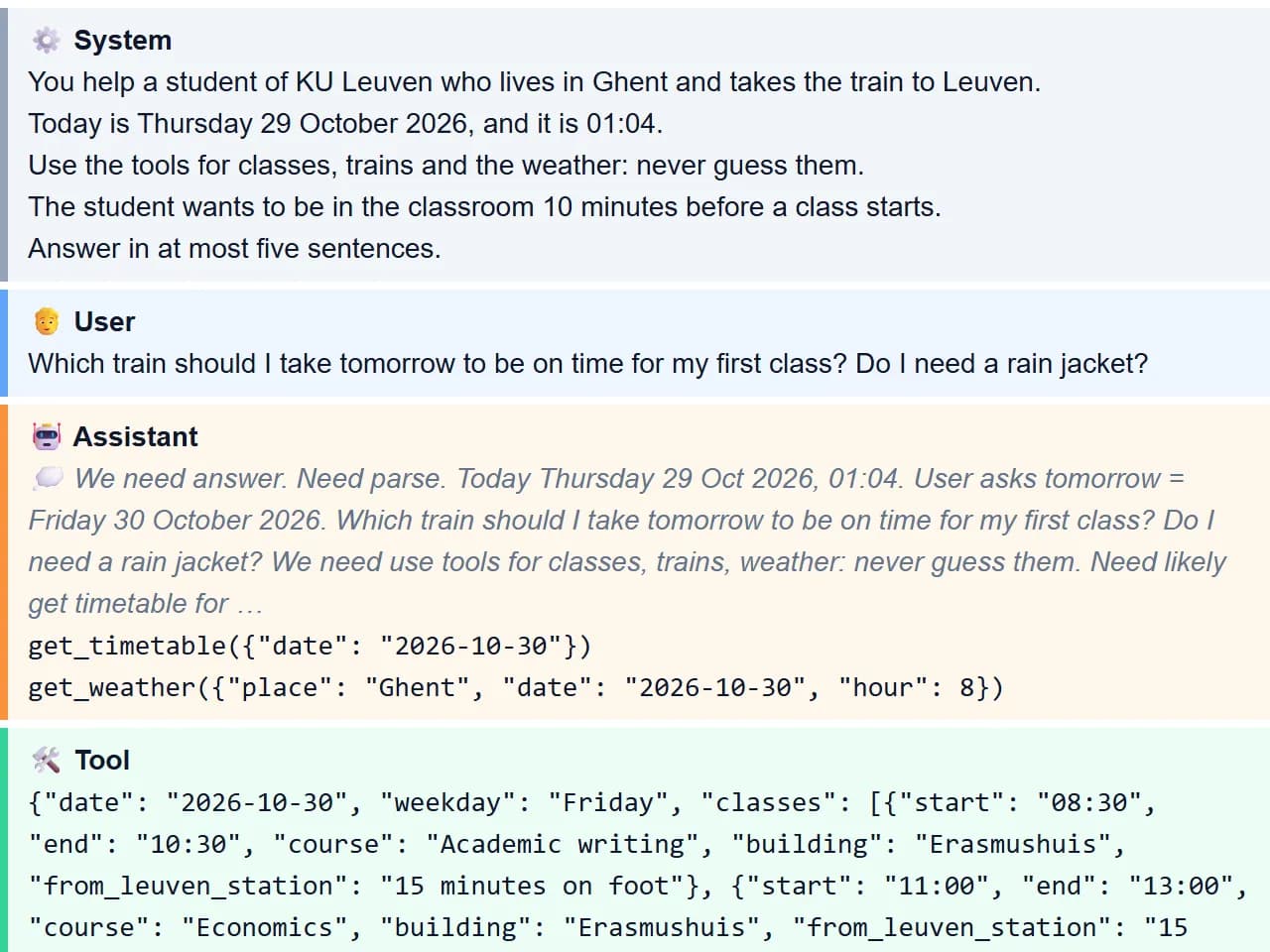
The system prompt holds what the model must always know: whom it helps, the date and the time, and how early the student wants to be in class. Then the question. The model thinks before every step, so this takes a minute or so. Is tomorrow a Saturday or a Sunday? Then there are no classes, so ask about Monday instead.
now = datetime.now(BRUSSELS)
SYSTEM = f"""You help a student of KU Leuven who lives in Ghent and takes the train to Leuven.
Today is {now:%A %d %B %Y}, and it is {now:%H:%M}.
Use the tools for classes, trains and the weather: never guess them.
The student wants to be in the classroom 10 minutes before a class starts.
Answer in at most five sentences."""
TOOLS = [get_timetable, find_trains, get_weather]

trip = run_agent("Which train should I take tomorrow to be on time for my first class? Do I need a rain jacket?", TOOLS, SYSTEM)You help a student of KU Leuven who lives in Ghent and takes the train to Leuven.
Today is Thursday 29 October 2026, and it is 01:04.
Use the tools for classes, trains and the weather: never guess them.
The student wants to be in the classroom 10 minutes before a class starts.
Answer in at most five sentences.
Which train should I take tomorrow to be on time for my first class? Do I need a rain jacket?
💭 We need answer. Need parse. Today Thursday 29 Oct 2026, 01:04. User asks tomorrow = Friday 30 October 2026. Which train should I take tomorrow to be on time for my first class? Do I need a rain jacket? We need use tools for classes, trains, weather: never guess them. Need likely get timetable for …
get_timetable({"date": "2026-10-30"})get_weather({"place": "Ghent", "date": "2026-10-30", "hour": 8}){"date": "2026-10-30", "weekday": "Friday", "classes": [{"start": "08:30", "end": "10:30", "course": "Academic writing", "building": "Erasmushuis", "from_leuven_station": "15 minutes on foot"}, {"start": "11:00", "end": "13:00", "course": "Economics", "building": "Erasmushuis", "from_leuven_station": "15 minutes on foot"}]}{"place": "Ghent", "time": "2026-10-30T08:00", "temperature_celsius": 8.0, "chance_of_rain_percent": 0, "rain_mm": 0.0, "wind_km_per_hour": 8.6}💭 Timetable shows first class at 08:30 in Erasmushuis, 15 min walk from Leuven station. Student wants to be in classroom 10 min before class => need to be at classroom by 08:20. So need to arrive at Leuven station by 08:05 (15 min walk). Need train from Ghent (Gent-Sint-Pieters) to Leuven arriving by …
find_trains({"to_station":"Leuven","date":"2026-10-30","time":"08:05","from_station":"Gent-Sint-Pieters","arrive_by":true})[{"departure": "05:59", "arrival": "07:04", "minutes": 65, "transfers": 0, "platform": "11", "delay_minutes": 0, "canceled": false}, {"departure": "06:25", "arrival": "07:23", "minutes": 58, "transfers": 0, "platform": "10", "delay_minutes": 0, "canceled": false}, {"departure": "06:36", "arrival": "07:39", "minutes": 63, "transfers": 1, "platform": "9", "delay_minutes": 0, "canceled": false}, {"de …💭 The student's first class is at 08:30 on Friday 30 October 2026. They need to be in the classroom 10 minutes before, so by 08:20. The class is at Erasmushuis, which is 15 minutes on foot from Leuven station. So they need to arrive at Leuven station by 08:05 at the latest (08:20 - 15 minutes = 08:05) …
Take the train departing Gent-Sint-Pieters at 06:55 (platform 9) which arrives in Leuven at 07:55. This gives you a comfortable 10-minute buffer before you need to be at the station (08:05) to walk 15 minutes to your 08:30 class in Erasmushuis.
No rain jacket needed: the forecast for Ghent at 8 AM shows 0% chance of rain and 8°C.
Read the script from top to bottom. Did the model look up the timetable first? Before what time did it want to arrive in Leuven, and does that fit the start of the first class, the way from the station and the 10 minutes? Nobody told it which tools to use, or in which order: that followed from the question and from the descriptions of the tools. Then check the answer against the tool results: the tools give the model the right data, but the model still has to combine them, and it can still pick the wrong train or count back wrong.
Your turn: ask something else. A few ideas:
- "Do I need an umbrella on the way home on Tuesday?"
- "I'm in Brussels-Central at 8. Can I still make my first class tomorrow?"
- "Which day this week can I sleep in the longest?"
trip = run_agent("I want to go home to Ghent after my last class on Friday. Which train can I take?", TOOLS, SYSTEM)You help a student of KU Leuven who lives in Ghent and takes the train to Leuven.
Today is Thursday 29 October 2026, and it is 01:04.
Use the tools for classes, trains and the weather: never guess them.
The student wants to be in the classroom 10 minutes before a class starts.
Answer in at most five sentences.
I want to go home to Ghent after my last class on Friday. Which train can I take?
💭 Let me break down what I need to find: 1. The user wants to go home to Ghent after their last class on Friday 2. Today is Thursday 29 October 2026, so Friday would be 30 October 2026 3. I need to find: - What classes the student has on Friday (using get_timetable for 2026-10-30) - Find the la …
I'll help you find a train from Leuven to Ghent after your last class on Friday. Let me first check your Friday class schedule.
get_timetable({"date": "2026-10-30"}){"date": "2026-10-30", "weekday": "Friday", "classes": [{"start": "08:30", "end": "10:30", "course": "Academic writing", "building": "Erasmushuis", "from_leuven_station": "15 minutes on foot"}, {"start": "11:00", "end": "13:00", "course": "Economics", "building": "Erasmushuis", "from_leuven_station": "15 minutes on foot"}]}💭 The student has two classes on Friday: 1. Academic writing: 08:30-10:30 2. Economics: 11:00-13:00 The last class ends at 13:00 (1 PM). The student wants to be 10 minutes before class starts, but for going home, they want to take a train after their last class. So they'd need to get from the class b …
I can see your last class on Friday is Economics, ending at 13:00. You'll need about 15 minutes to walk from Erasmushuis to Leuven station. Let me find trains from Leuven to Ghent after that.
find_trains({"from_station":"Leuven","to_station":"Gent-Sint-Pieters","date":"2026-10-30","time":"13:00"})[{"departure": "13:06", "arrival": "14:06", "minutes": 60, "transfers": 0, "platform": "2", "delay_minutes": 0, "canceled": false}, {"departure": "13:07", "arrival": "14:19", "minutes": 72, "transfers": 0, "platform": "1", "delay_minutes": 0, "canceled": false}, {"departure": "13:36", "arrival": "14:35", "minutes": 59, "transfers": 0, "platform": "1", "delay_minutes": 0, "canceled": false}, {"depa …💭 The last class ends at 13:00, and you need 15 minutes to walk to Leuven station, so you'd be at the station around 13:15. The first train after your class would be the 13:36 train arriving in Ghent at 14:35 (or the 13:58 train arriving at 14:57). Actually, let me think about this. The class ends at …
After your last class (Economics, ending at 13:00) and the 15-minute walk to Leuven station, you can take the train departing at 13:36, which arrives in Ghent-Sint-Pieters at 14:35. This is a direct train with no transfers and no delays. Alternatively, the 13:58 train arrives at 14:57 if you prefer more time to rest after class.
🧰 An agent for your own problem
The recipe for an agent of your own:
- Write every tool as an ordinary Python function, with type hints and a docstring that says what it does and when to use it. The docstring is the only manual the model gets: "Use this for every question about …" helps more than you'd think. Let the function return little: a few fields, not everything an API sends.
- Put in the system prompt what the model must always know: whom it helps, today's date, the rules.
- Call
run_agent(question, [my_tool, my_other_tool], system), and read the script before you trust the answer.
A tool can be anything you can write as a function: a model from another notebook (a decision tree that predicts something), a CPMpy solver that makes a schedule, a search through your own data with pandas, or another free API, such as the departure boards of iRail (external link) or the history of Open-Meteo (external link). Prefer tools that only read. An agent that can also act (send an e-mail, delete a file, book a room) should ask a person first, for the reasons in the chapter's section on keeping watch. And when you want data instead of text, such as a label for every message, ask for structured output: with the option response_format, which ask passes on, the model fills in the fields that you describe.
Two more tips. Every run costs requests and gives a slightly different answer, so save the conversations you want to keep with json.dump, and load them again with json.load instead of asking the model a second time. And most other providers understand the same requests: give client another base_url and key, and leave out the OpenRouter option in ask. Agent frameworks and the Model Context Protocol run the same loop as run_agent, with more around it; now you know what happens inside.
By Thomas Winters (external link) for AI voor Iedereen, KU Leuven. The latest version of this notebook: ai.kuleuven.be/aivooriedereen/en/notebook/large-language-models.